Sign in
- Open the sign-in link from your welcome email, or the AppyShift app. You can also go to appyshift.com/portal/login.
- Enter your Email. It's the work email your employer has on file for you.
- Enter your Password. The first time, use the temporary password from your welcome email.
-
Select Sign In.
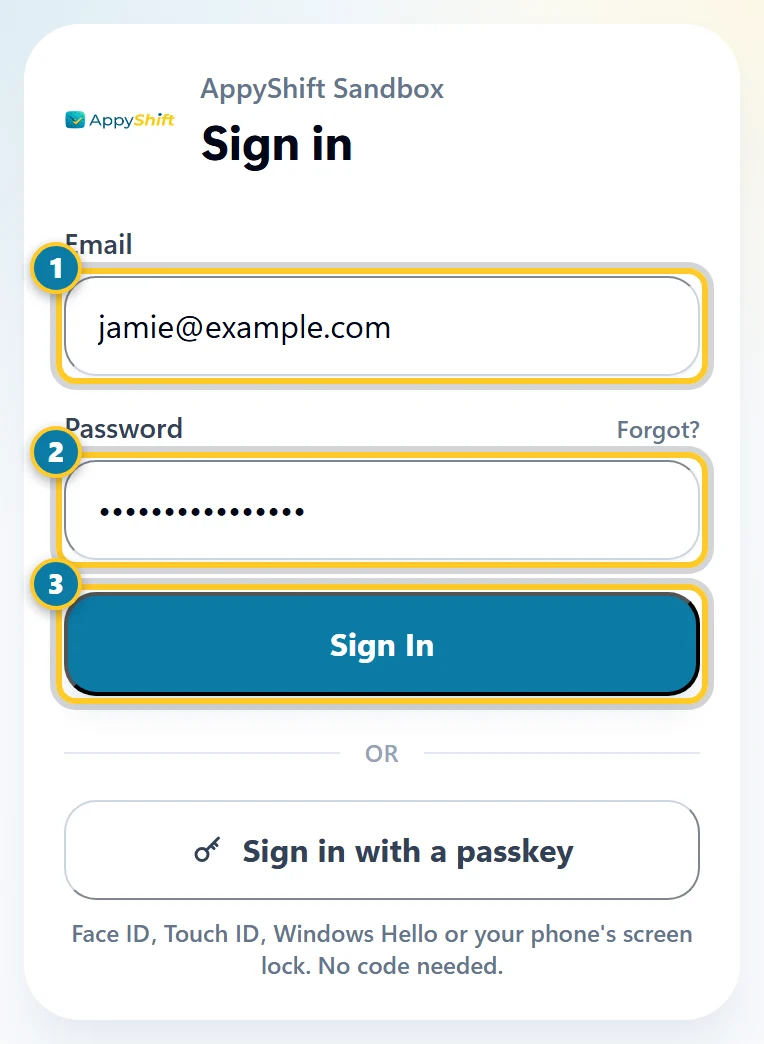
Enter your email (1) and password (2), then select Sign In (3).
Home opens. If your account is linked to more than one employer, you first see Choose an employer: select the one you want.
If you're asked for a code, your company uses two-step sign-in. See Turn on two-step sign-in.
Sign in with your phone number
Some companies let you sign in with your mobile number and a code we text you, with no password. If yours does, the sign-in page shows Sign in with your phone number instead.
- On your company's sign-in page, select Sign in with your phone number instead.
- Type the mobile number your employer has for you, then select Text me a code.
- Type the 6-digit code from the text and select Sign in. The code works once, for 10 minutes.
If your company uses two-step sign-in, you're asked for that code too.
Got a text invite?
If your employer texted you a link to finish setting up, open it on your phone. If your employer has your email, choose a password and select Finish and sign in. If not, select Finish and sign in, and from then on sign in with your phone number. The link works once, for 7 days. If it expired, ask your manager for a new one.
After your first sign-in
- Change your temporary password: select Me, then scroll to Change Password.
- On your own phone or computer, set up Face ID or a fingerprint so you can sign in faster next time. See Sign in with Face ID or a fingerprint.
Can't sign in?
- "Invalid email or password." Check the email for typos and try again, or select Forgot? to set a new password.
- No welcome email, or your email is wrong? Your employer has to turn on your access first, and AppyShift can't do that for you. Ask your manager to check that your access is on and your email is right.
- To sign out, open Me and select Sign out at the top of the page.